Monthly price
Küchendisplay
- Kassa with RKSV12,00
- Plätze5,90
SUMME17,90
€ per month, Netto

Scenes generated with AI. Real screens.
Whatever you ring up at the Kassa shows up in the Küche at once, split by Gänge, with notes and extras. Any tablet or screen with a browser becomes a Küchendisplay and costs nothing extra.
No Kreditkarte. The trial ends on its own.
A kitchen display system (KDS) for every Bestellung: from the Kassa, by QR code at the Tisch and from the kiosk, plus deliveries.
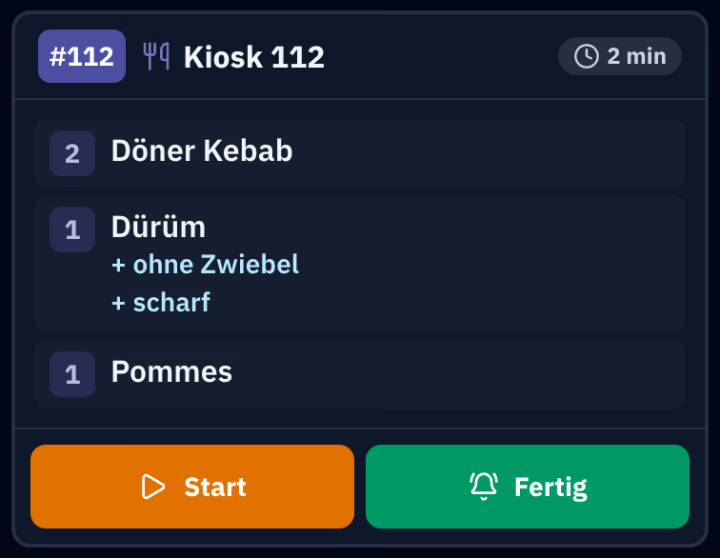
The Kassa sends new items with Gang, note and extras. A second tap only sends what has been added since.
Up to four Gänge per Bon, shown separately on the display and on the Küchenbon. The Küche knows what goes out first.
On each Artikel you decide where it goes: drinks to the Bar, food to the Küche. Each screen shows its own station and remembers it.
Each ticket shows how long it has been waiting. After 5 minutes the border turns yellow, after 10 minutes red.
The Küche taps finished lines to tick them off, and “Done” notifies the person who rang it up on their device. At the Kassa, every item shows whether it is in progress or ready.
If something is cancelled, the line is struck through in red, with the reason. A red banner stays at the top for ten minutes, so nobody cooks for nothing.
The owner switches on the Küchendisplay under Admin, casse account, Modules, at Plätze (Seats).
Set up a tablet or screen with a browser and choose the role Küche under Admin, devices. After login it opens the Küchendisplay straight away.
At the Kassa, tap “To the Küche”. The Küche taps “Start” and “Done”, and “Served” once the food is out.
The Küchendisplay is part of the Plätze module (Seats) and does not count as a Kassa. With the Kassa, € 17,90 per month, net; try it free for 30 days.
€ per month, Netto
No. Any tablet or screen with a browser becomes a Küchendisplay; it does not count as a Kassa and costs nothing extra.
Yes. With a Bondrucker on the device in the Küche, one tap prints the Küchenbon, or every new Bestellung prints automatically if you wish. It shows number, Tisch, time and, per Gang, the dishes with notes, without prices.
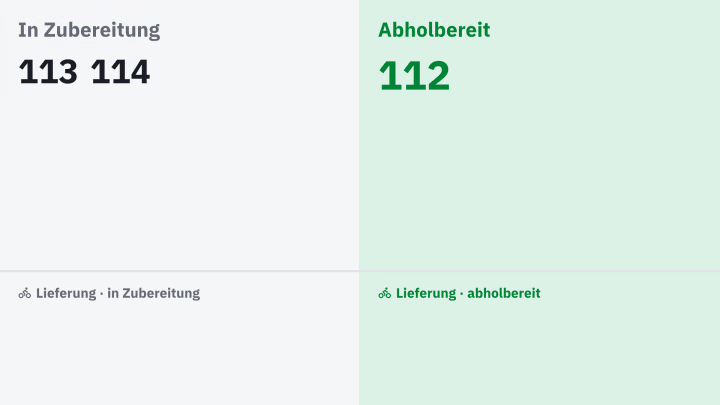
Yes, on a screen at the counter: being prepared on the left, ready for pickup on the right. What the Küche marks as ready moves to the right; it shows Bestellungen without a Tisch, for example from the kiosk.
Yes. Bestellungen by QR code at the Tisch, from the kiosk, and deliveries you record in the Kassa all appear on the same screen. Kiosk and Lieferung are separate modules.
A screen in the Küche instead of paper slips: it shows every Bestellung with time, Gang and note, and fetches new ones by itself every few seconds. In casse it is called the Küchendisplay.